

In this article, Juniper Networks shares two practical GenAI use cases in Finance that redefine finance...

Three Practical Ways to Speed Up Month-End Closing with AI
January 15, 2026

Introduction
Generative AI (GenAI) tools such as ChatGPT, Gemini, and Copilot have become popular for boosting productivity across various business functions. These models are probabilistic by nature.
This means that they generate responses based on patterns and likelihoods rather than guaranteed outcomes. This makes them powerful for drafting and ideation, but less reliable for activities requiring deterministic precision, such as reconciliations, reporting, and variance calculations.
Fortunately, there’s a way to combine both worlds.
You can leverage GenAI tools as intelligent assistants while ensuring deterministic results by instructing them to use Python, an open-source programming language that all large language models understand.
By doing so, finance teams can use AI for automation and consistency, running the resulting code in trusted environments such as Python in Excel, Google Colab, PyCharm, or Visual Studio.
This hybrid approach, which combines LLM intelligence with Python’s reliability, is transforming how FP&A teams approach the month-end closing process.
Below are three practical applications that can save hours, reduce errors, and enhance insight quality.
1. Automating Variance Analysis
Variance analysis is one of the most time-consuming and repetitive parts of month-end reporting. Finance teams spend countless hours comparing actual results against budgets, identifying deviations, and preparing detailed commentary. Much of this process can be automated with AI and Python.
Using an LLM, you can generate Python code that reads your financial data, calculates month-on-month or budget-to-actual variances, and flags significant differences automatically. For example, you might prompt ChatGPT with:
“Write Python code to calculate revenue and cost variances by department and highlight differences greater than 5%.”
The model produces a ready-to-run script, which you can then execute safely in your preferred environment.
The output could automatically generate tables, graphs, or even commentary templates.
With a few adjustments, this workflow can:
- Pull data directly from your ERP or Excel files,
- Apply business rules (e.g., ignore immaterial variances),
- Produce a formatted summary ready for Power BI or management reports.
The result? Analysts spend less time crunching numbers and more time interpreting the results and advising stakeholders.
Code 1: import pandas as pd # Load budget and actuals from Excel # Calculate variance # Flag significant variances # Export results |
Code 1. Python script for automating variance analysis (deterministic calculations)
2. Mapping of Accounts — Eliminating Spreadsheet Errors
Another bottleneck in month-end closing is account mapping. Organisations often manage multiple systems — ERP, consolidation tools, or business units using different chart-of-accounts structures. Mapping these manually in spreadsheets can be tedious, error-prone, and inconsistent.
Python can streamline this with rule-based automation. You can design mapping logic once and apply it consistently each month. For instance, you can define rules such as:
- If the account name contains “Revenue”, map it to the “Sales” category.
- If the cost centre starts with “R&D”, map it under “Innovation Expenses”.
By using Python dictionaries or lookup tables, these mappings can be automated with full traceability. If something changes, say, a new account is added, the script can highlight unmapped items for review instead of silently misclassifying them.
You can even use a GenAI tool to help you write these mapping rules:
“Generate Python code to map GL accounts from an Excel file into my corporate reporting categories based on keywords.”
The LLM provides the script; you review and test it in your controlled environment. This method saves time, ensures compliance with internal reporting standards, and drastically reduces spreadsheet fatigue.
Code 2: import pandas as pd # Load chart of accounts # Define mapping logic df["Mapped Category"] = df["Account Name"].apply(map_account) # Save mapped file |
Code 2. Python script for automated account mapping
3. FP&A Commentary Generation — Context-Aware and Consistent
Once numbers are finalised, FP&A teams face another challenge: producing commentary that clearly and consistently explains performance drivers. Drafting these narratives can take days, especially across multiple business units.
This is where GenAI shines. You can upload or feed the model with:
- Past monthly commentaries,
- Company reporting guidelines and tone of voice,
- Current variance data or key figures.
Then prompt it to draft updated commentary for the current period. For example:
“Based on the attached data and previous reports, write this month’s FP&A commentary for the EMEA region, maintaining our professional tone and focusing on revenue, margin, and operating expenses.”
The model can instantly generate a first draft aligned with your corporate style. You can also instruct it to highlight anomalies or suggest questions for further investigation.
For added assurance, combine this approach with Python-based validation: run your variance calculations deterministically in Python, then use the GenAI output to describe why those numbers moved. This creates a human-in-the-loop process — AI for speed, humans for insight.
Summary
AI won’t replace financial judgment, but it can radically improve the efficiency and accuracy of month-end closing. By combining probabilistic GenAI tools for ideation and communication with deterministic Python scripts for data processing, FP&A teams can achieve faster closes without compromising quality.
To recap, the three practical AI applications are:
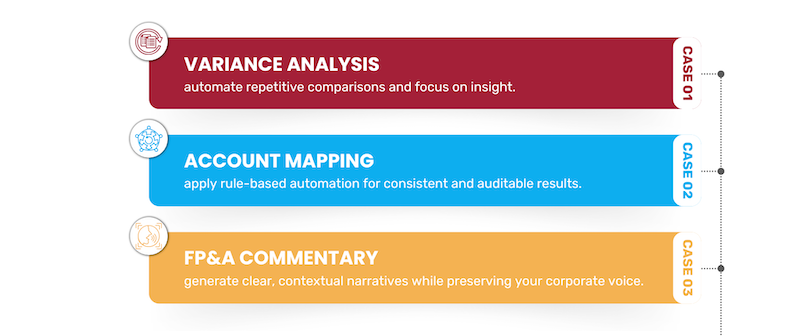
Figure 1. Three AI Use Cases to Speed Up Month-End Closing
Month-end will always involve deadlines and complexity, but with this pragmatic use of AI and Python, CFOs can turn it from a stressful reporting cycle into a streamlined, insight-driven process.
To help FP&A leaders integrate AI and Python into their month-end process in a structured and manageable way, here is my take on a simple 30-day adoption plan.
It breaks the journey you will undertake into four weekly steps: starting with foundational setup, moving into variance automation, scaling into account-mapping automation, and finally integrating AI-generated commentary.
Week 1 — Set Up & Pilot a Quick Win
- Set up your AI + Python environment (Python in Excel, Google Colab, VS Code).
- Run the sample scripts with dummy data to get comfortable with the workflow.
- Identify 1–2 repetitive close tasks suitable for automation.
- Use ChatGPT to generate simple Python scripts and test them in your environment.
- Share early results to build team buy-in.
Week 2 — Automate Variance Analysis
- Connect Python scripts to actual ERP/Excel month-end data feeds.
- Add business rules (thresholds, formatting, department filters).
- Validate automated variance results against your manual process.
- Use GenAI to draft commentary templates based on the Python-verified numbers.
- Publish an internal “AI-assisted variance pack” as a proof of concept.
Week 3 — Implement Account Mapping Automation
- Document current chart-of-accounts mapping rules and exceptions.
- Use GenAI to convert those rules into Python functions or lookup tables.
- Run the mapping script on last month’s data and check for accuracy.
- Add alerts for unmapped or new GL accounts.
- Embed the automated mapping step into your month-end workflow.
Week 4 — Scale Commentary & Operationalise the Hybrid Workflow
- Feed past commentaries, tone guidelines, and variance outputs into GenAI.
- Generate first-draft commentaries for regions or business units.
- Train analysts to review and refine AI-generated narratives.
- Document an SOP for running scripts, validating outputs, and producing commentary.
- Identify the next automation candidates (KPIs, forecasting, accruals) and present results to leadership.
If you’d like to explore the techniques described above in more depth, a short demonstration video is available here:
https://www.youtube.com/watch?v=NpK4bALWQ0A&t=367s
Further professional information about the author is available on their LinkedIn profile:
https://www.linkedin.com/in/christianmartinezthefinancialfox/
The full text is available for registered users. Please register to view the rest of the article.
Related articles

In this article, the author explores how the evolution of dashboards and AI-powered business intelligence mirrors...

In this article, the authors show how AI agents can turn messy earnings call transcripts into...

In this article, the author explores how AI-driven tools are shifting FP&A from manual processes to...
The 23rd meeting of the Global AI/ML FP&A Committee, which took place on June 4th, 2024, featured...

This article explores how Large Language Models (LLMs) could improve FP&A productivity and redefine finance Business...
+
Subscribe to
FP&A Trends Digest

We will regularly update you on the latest trends and developments in FP&A. Take the opportunity to have articles written by finance thought leaders delivered directly to your inbox; watch compelling webinars; connect with like-minded professionals; and become a part of our global community.